How to Choose a Chinese Ink Phone Wallpaper
A Chinese ink phone wallpaper can look striking in a gallery and feel quite different beneath your clock and app icons. Before choosing one, compare three things: the color you enjoy, the open space around the artwork, and the crop your screen will need.
Here we use hebo's Pointillist Ink Phone Wallpapers — 6-Piece Set to make that comparison concrete. The set combines ink-inspired landscapes and dotted textures in red, yellow, and blue-green. You receive all three palettes, with two PNG wallpapers in each.
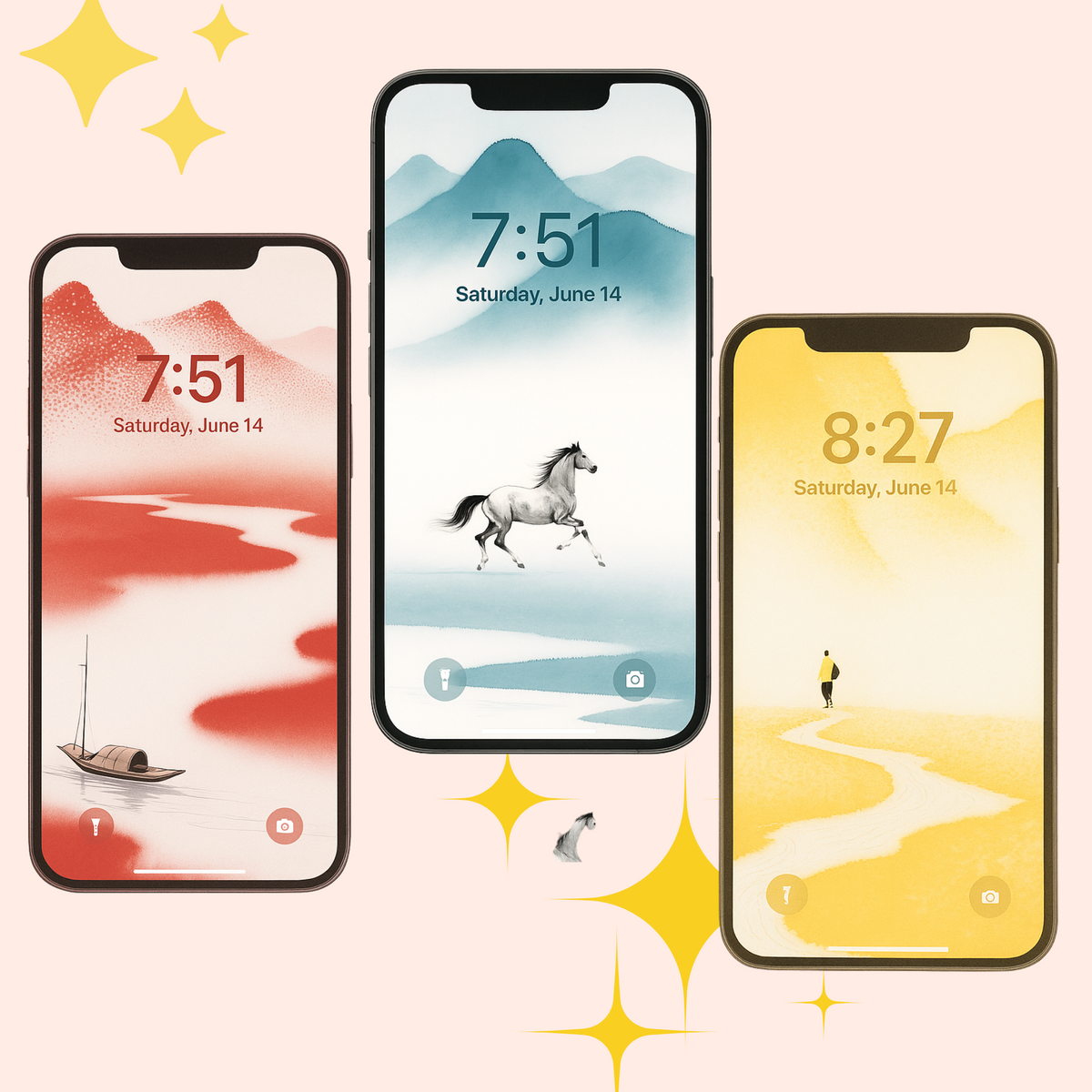
Start with the color you want to see every day
In these previews, red makes a warm, noticeable accent; yellow gives a lighter, warm impression; blue-green offers a cooler alternative. Those are visual choices, rather than promises about how a color will make you feel. Compare them with the app icons and clock color you normally use.
- Red: consider it when you want the colored parts of the landscape to stand out in your screen layout.
- Yellow: compare how clearly your clock and icon labels remain visible over the lighter areas.
- Blue-green: consider it if you prefer a cooler palette, then check whether your existing icons are still easy to distinguish.
You do not need to choose a single color at checkout for this set: all three are included. You can use one palette on your Lock Screen and another on your Home Screen, or change them later on your own devices.
Look at the open space, not only the main subject
Negative space means the quieter, less detailed areas around a subject. In a phone wallpaper, those areas can give the clock, widgets, and labels room to remain readable. A detailed landscape may work well on a relatively empty Lock Screen, while your Home Screen may need a quieter crop.
Look at where your phone places its clock and most-used icons. Ask whether an important feature in the artwork would sit beneath them. There is no single placement that works for every phone or every layout, so treat the shop preview as a starting point.
Check the file size and allow for cropping
This set is listed at 1766 × 3840 pixels per PNG, a tall portrait format. A phone with a different screen shape may crop the sides or the top and bottom when it fills the screen. A higher pixel count alone does not guarantee an identical composition on every device.
Use the downloaded PNG rather than a screenshot of a shop mockup. Start with as little extra zoom as possible, then adjust the position to keep the detail you care about visible. Check the Lock Screen and Home Screen separately. Display settings can also change the way colors appear.
A simple way to compare the set after downloading
- Choose one PNG from each palette and compare them with your usual screen layout.
- Check your clock, widgets, and icon labels against both pale and detailed areas.
- Adjust the crop without covering the part of the landscape you want to keep.
- Keep the original files so you can try a different crop or palette later.
For the download, ZIP extraction, and device setup steps, use our iPhone and Android wallpaper setup guide.
Know what your purchase includes
The six-wallpaper set is a digital download supplied as three ZIP files. No printed artwork or physical item is shipped. The license allows use on your own personal devices, including cropping and resizing for that purpose; it does not allow resale, commercial use, or sharing the original files publicly.
See the product page for all previews and the current price. If you need help with a download or file, visit Download Help or contact DaonityStudio.